True RMS Power
Understand how to measure True RMS Power. Learn which tools and meter specifications you need to capture valid RMS readings. Follow a clear, step-by-step procedure to take multiple spot measurements and record your data for analysis and use in calculations.
Measurement Overview
What:Hourly electrical energy (kWh) and power draw (kW).
Why:Gather power data needed to estimate annual energy consumption of systems and components.
Duration:Best practice is to collect the data for a minimum of six weeks at one-hour intervals; longer measurement periods are encouraged for deeper analysis of the equipment.
When:Measurements should be taken when the system or component is operating under normal conditions.
Type of Measurement:Direct or Proxy.
This technique uses a data logger to take long-term measurements of the electrical energy (kWh) and power draw (kW) of a system or component at one-hour intervals. Measurements are taken at the electrical distribution system (specifically at a panelboard, power panel, or switchgear) that serves the system or component. Measurement data is used to estimate the annual energy consumption of the system or component.
Data loggers and power meters use instantaneous measurements of current and voltage to calculate the instantaneous power draw. Over time, the logger or meter calculates the average power draw. Manufacturers of measurement tools use different calculations for power draw. In order to compare data obtained from different measurement equipment, it is important to understand the calculation used by the equipment. The manufacturer’s user manual or technical specifications discuss these features in detail.
The duration of the long-term measurement and when to measure is dependent on the system and the operation of the building. Best practice is to collect the data for a minimum of six weeks at one-hour intervals; longer measurement periods are encouraged for deeper analysis of the equipment. Measurements should be taken when the system or component is operating under normal conditions.
- Direct: Specifies a quantity of the exact item being measured.
- Proxy: Provides an indication of the system operation but does not directly measure the quantity in question.
Measurement Tools
The measurement tool needed for this procedure is a lighting on/off data logger. Some data loggers may have an additional occupancy sensor that detects the motion of people, but this is not necessary for this measurement technique.
When a lighting system turns on, it emits photons. The lighting on/off sensor operates by using a photosensor to detect the light level and records the length of time for which the light is detected. The runtime period is considered complete once the light turns off, the light level decreases, and the sensor no longer detects the emitted photons. The logger records the amount of time that the light was detected (i.e., the lights were on) and documents this in its internal storage for each hour interval. Loggers require calibration prior to each use. To do this, the lights should be on, and the logger should be placed in a location that is unshaded, but also not too close to other light sources (such as sunlight or other fixtures), because the logger may detect those and collect unwanted data.
NYC agency personnel can borrow measurement data loggers, meters, or sensors from our tool library, by selecting tools based on the required measurement duration. See recommended tools found in our library:
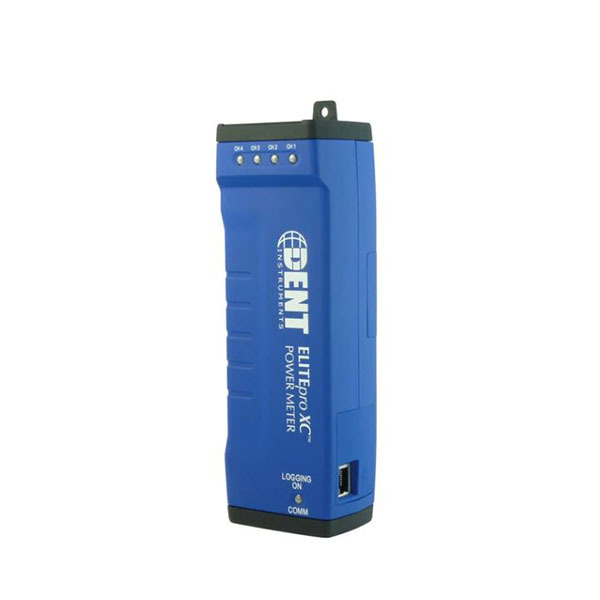
Provides a measurement of true RMS power from voltage and current inputs and records long-term power (kW) and energy (kWh) measurements.
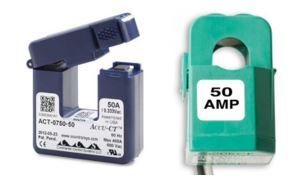
Split-core CTs provide accurate measurements of high alternating current. CTs may be installed without disconnecting wires or interrupting power.
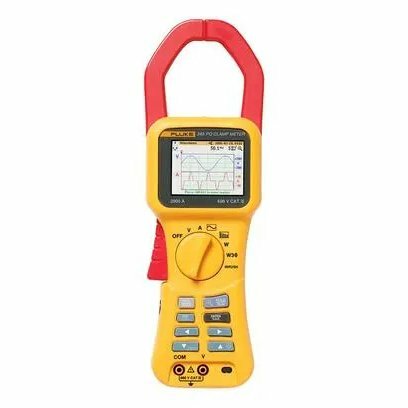
Multi-purpose electrical measurement tool used to take true RMS power readings over a short period of time.
Measurement Steps
The following sections assume a data logger is being used. For details on measurement with a power meter, refer to the Electrical Spot Measurement technique.
Prepare Tools
Use the manufacturer’s software to set up and launch the logger(s). Refer to the equipment’s user manual for detailed instructions on how to set up the logger.
- Logging interval: 1-hour
- Date and time to start logging
- Date and time to stop logging
- Values to measure: Power (kW), Energy (kWh)
An example of how to set up the Dent EliteProXC power data logger is shown in the video below.
Install Tools
- Confirm that the equipment is operational.
- Determine whether the distribution system supplies electricity to any unrelated loads to avoid measuring unintended energy consumption.
- Identify the wiring configuration of the distribution system. This will determine how to set up the logger and sensors.
- Clamp the sensors around the electrical wires. Make sure they are facing the right direction, or the current may be recorded with negative values.
- Based on the wiring configuration and instructions from the equipment’s user manual, install the sensor and logger to measure the power and energy to the system.
This section illustrates the most common wire configurations for a panelboard and how the Dent EliteProXC data logger is connected.
Verify Data Acquisition
Wait 24-48 hours to verify data collection. Return to the location of the measured equipment and use a laptop or a phone with the manufacturer’s proprietary software installed to do the following:
- If necessary, connect the logger to a laptop or phone via USB cable. Otherwise, use the software to connect with the data logger via Bluetooth.
- Analyze the data with a plot graph. This can be done with the proprietary software or Microsoft Excel after exporting the dataset as a .csv file.
- Determine whether the results align with the expected operation of the equipment being measured.
Retrieve Tools and Data
After verifying that the logger is collecting data, do the following:
- Allow the logger to collect data for the remainder of the measurement period.
- After the measurement period has concluded, remove the logger from the panel.
- If necessary, connect the logger to a laptop or phone via USB cable. Otherwise, use the software to connect with the data logger via Bluetooth.
- Use the proprietary software to stop the logger and end data collection.
- Download all data from the logger and save the file in the .csv file format for analysis.
Select Calculator(s)
These calculators will output estimated annual energy consumption for relevant components using measured data. Download the calculator for your specific component’s measurement strategy and add your measurement data.
Fans and Motors
For AHU, Condenser, Burner and Cooling Tower Fans and Motors
Constant Single Speed Fan Energy (kW) CalculatorEstimates annual electricity usage two fans motors, a supply fan motor and a return fan motor, using power data.
Estimates annual electricity usage two fans motors, a supply fan motor and a return fan motor, using power data.
Constant Speed Cooling Tower Fan Energy (kW) CalculatorEstimates annual electricity consumption for up to four (4) constant speed cooling towers, using power data.
Estimates annual electricity consumption for up to four (4) constant speed cooling towers, using power data.
Variable Speed Fan Energy (kW) CalculatorEstimates annual electricity usage of two variable-speed fan motors using power data.
Estimates annual electricity usage of two variable-speed fan motors using power data.
Variable Speed Cooling Tower Fan Energy (kW) CalculatorEstimates annual electricity consumption for multiple variable speed cooling tower fans, using power data.
Estimates annual electricity consumption for multiple variable speed cooling tower fans, using power data.
Pumps and Motors
For all Pumps and Motors
Constant Single Speed Pump Energy (kW) CalculatorEstimates annual electricity consumption of a constant speed pump, using power data.
Estimates annual electricity consumption of a constant speed pump, using power data.
Variable Speed Pump Energy (kW) CalculatorEstimates annual electricity consumption of a variable speed chiller pump, using power data.
Estimates annual electricity consumption of a variable speed chiller pump, using power data.
Lighting Fixtures
Lighting Fixture Energy (Energy From Panelboard) CalculatorEstimates annual electricity consumption of a dedicated lighting panel, using kWh of the panelboard.
Estimates annual electricity consumption of a dedicated lighting panel, using kWh of the panelboard.
Troubleshooting
This section provides some troubleshooting tips for the most common issues with tool installation.